Guide 12 of 12 · Growing
Connect your own domain
Put your online shop on a web address of your own.
Your shop already has an address, e.g. njeriduka.shop.kwimba.co. On the Growth and Ultra plans you can also put it on a domain of your own, like shop.njeriduka.co.ke. It's easier to remember, looks more established, and is yours to keep.
By the end of this guide your shop will answer on your own domain.
Before you start
You need a domain, bought from a domain registrar. In Kenya that's any .co.ke registrar, or an international one for .com. You'll be adding two records in the registrar's DNS settings, so have your login ready.
Use a subdomain, like
shop.yourbusiness.co.keorwww.yourbusiness.co.ke, rather than the bareyourbusiness.co.ke. Many registrars don't allow the record your shop needs on a bare domain. A subdomain works everywhere, and leaves the bare domain free for a website or email.
Step 1: Add the domain in Kwimba
- Open the menu (☰), tap Settings, then Online shop.
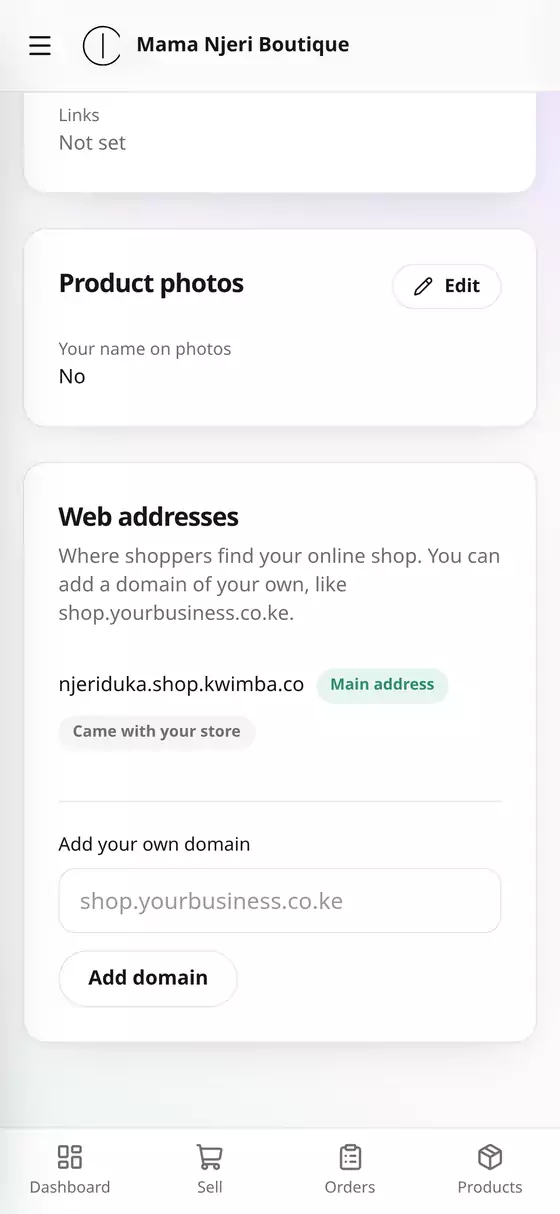
- Scroll to Web addresses. Your current address is there, marked Main address and Came with your store.
- Under Add your own domain, type it, e.g. shop.njeriduka.co.ke, and tap Add domain.
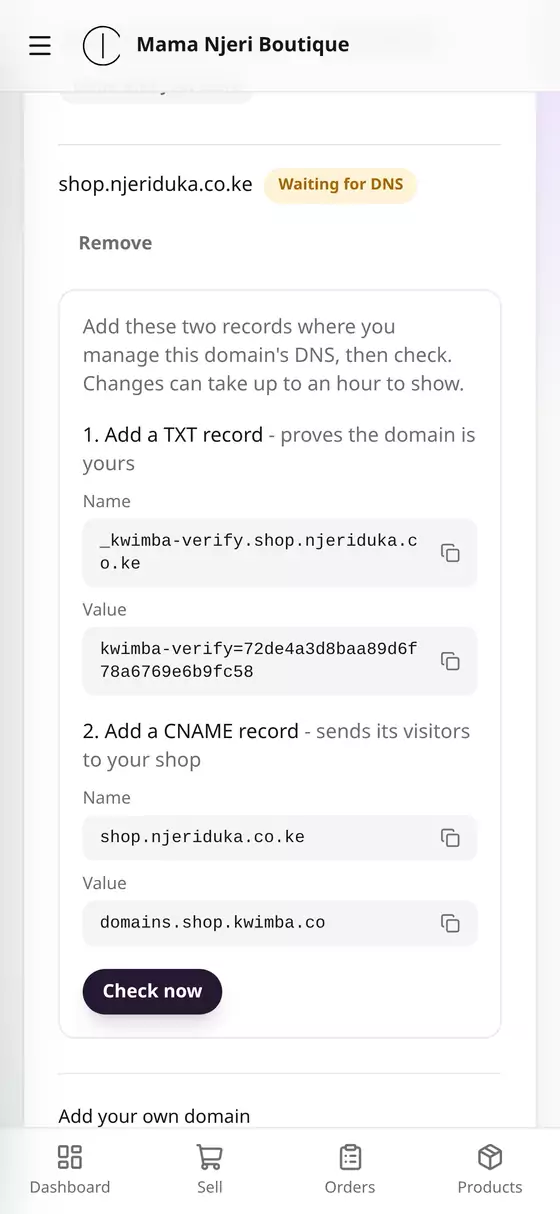
The domain is added as Waiting for DNS, with two records for you to create.
Step 2: Add the two records at your registrar
Log in to your registrar, open the DNS settings for your domain, and add both records exactly as Kwimba shows them. Tap the copy icon beside each Name and Value to copy it.
- A TXT record: proves the domain is yours.
- Name: e.g.
_kwimba-verify.shop.njeriduka.co.ke - Value: e.g.
kwimba-verify=65dc…
- Name: e.g.
- A CNAME record: sends your domain's visitors to your shop.
- Name: e.g.
shop.njeriduka.co.ke - Value:
domains.shop.kwimba.co
- Name: e.g.
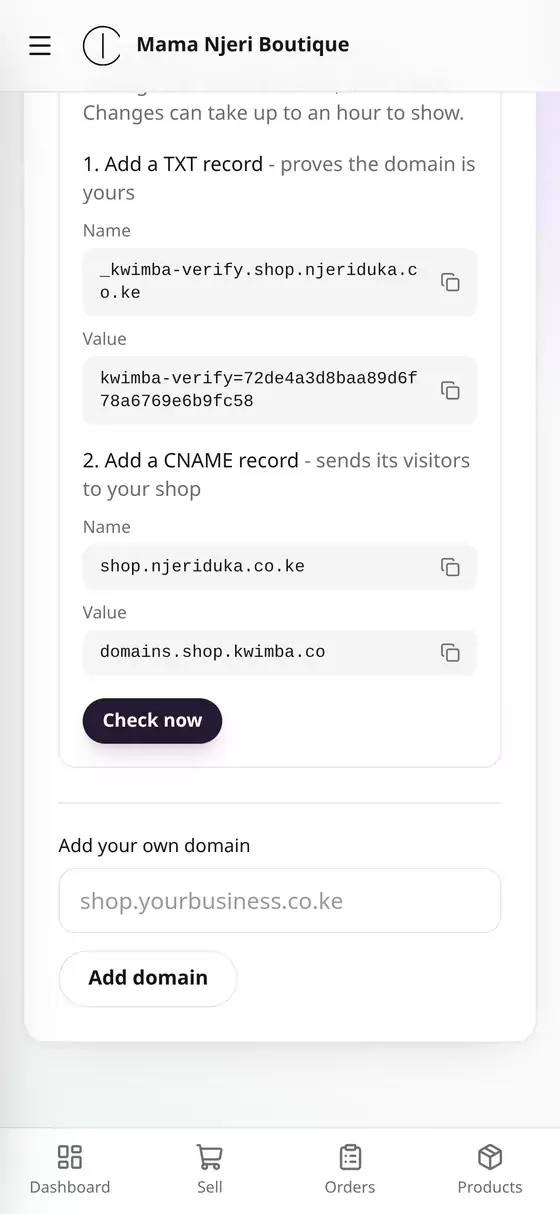
Some registrars want only the first part of the name, e.g.
_kwimba-verify.shopinstead of the whole thing, and add your domain themselves. If yours does, leave off the.njeriduka.co.keending.
Step 3: Check
Back in Kwimba, tap Check now.
- Found: your domain is connected. Tap Make main address to make it the one your shop uses everywhere.
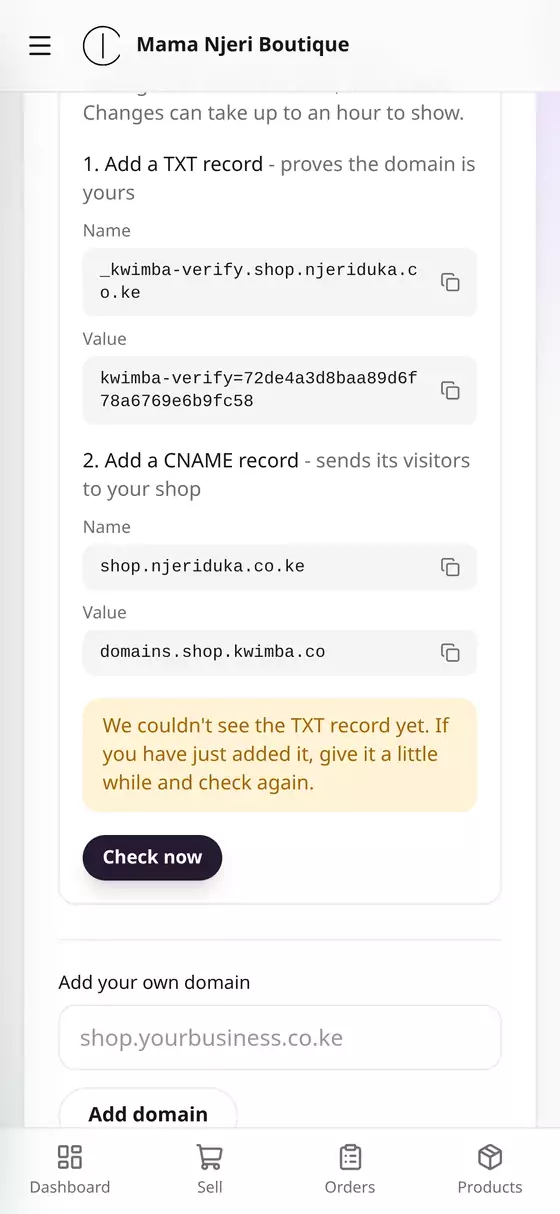
- "We couldn't see the TXT record yet": DNS changes can take up to an hour to reach everywhere. Give it a little while and tap Check now again.
Once it's connected, your shop gets its secure padlock (HTTPS) by itself, with nothing to buy or set up. The very first visit can take a few seconds longer while that's arranged. Your old .shop.kwimba.co address keeps working too.
Questions
I'm on Starter. Your own domain comes with Growth and Ultra. Move plans from Billing.
Can I remove a domain?
Yes. Tap Remove beside it. Your shop stops answering there, and your .shop.kwimba.co address carries on.
It's been more than a day and it still isn't found. Check that the TXT record's name and value are exactly as shown, with no spaces or quotes. Then WhatsApp us and we'll look with you.